


How often do you catch yourself scrolling through your phone, switching between work tabs, answering messages and staring at a screen for hours without taking a proper break?
In today's digital-first lifestyle, screens have become almost impossible to avoid. From working on laptops and attending virtual meetings to watching television and scrolling through social media, many of us spend a significant part of the day looking at digital devices.
And while technology makes life easier, too much screen time can leave you feeling mentally exhausted and physically stiff. Tired eyes, headaches, neck and shoulder tension, poor posture, restlessness and difficulty switching off after work are common complaints associated with prolonged screen use.
The good news? You don't need a complicated workout to reset after a long day at your desk. A few minutes of gentle yoga for digital fatigue can help you move your body, relax tense muscles, slow down your breathing and give your mind a much-needed break.
These simple yoga poses are particularly useful after prolonged computer or smartphone use and can easily be incorporated into your workday or evening routine.
So, step away from the screen, roll out your mat and take a few mindful breaths. Let us get started!

What Is Digital Fatigue?
Digital fatigue is a term commonly used to describe the physical and mental tiredness associated with prolonged or intensive use of digital devices.
It may involve symptoms such as:
Tired or uncomfortable eyes
Headaches
Neck and shoulder stiffness
Back discomfort
Mental exhaustion
Restlessness
Difficulty relaxing after screen use
Poor posture
General feelings of fatigue
Extended periods of near-focus and reduced blinking can contribute to digital eye discomfort, while prolonged sitting and static postures can place additional strain on the neck, shoulders and back.
Mental fatigue can also develop when the brain is constantly switching between emails, notifications, meetings, social media and other digital stimuli.
Yoga cannot eliminate the effects of excessive screen exposure, but regular movement breaks, stretching, breathing exercises and relaxation can complement healthy screen habits.
How Does Yoga Help With Digital Fatigue?
Yoga combines gentle physical movement with controlled breathing and mindfulness, making it a useful way to break up long periods of sedentary screen use.
Regular practice may help:
Release tension in the neck, shoulders and back
Improve flexibility and mobility
Encourage better posture awareness
Reduce perceived stress
Promote relaxation
Improve body awareness
Encourage mindful breathing
Provide a healthy break from digital devices
The key is consistency. You don't necessarily need a 60-minute yoga session. Even a 5–10-minute movement break can help interrupt prolonged sitting.
Also Read: Yoga for Depression: 5 Proven Uplifting Asanas To Elevate Your Mood
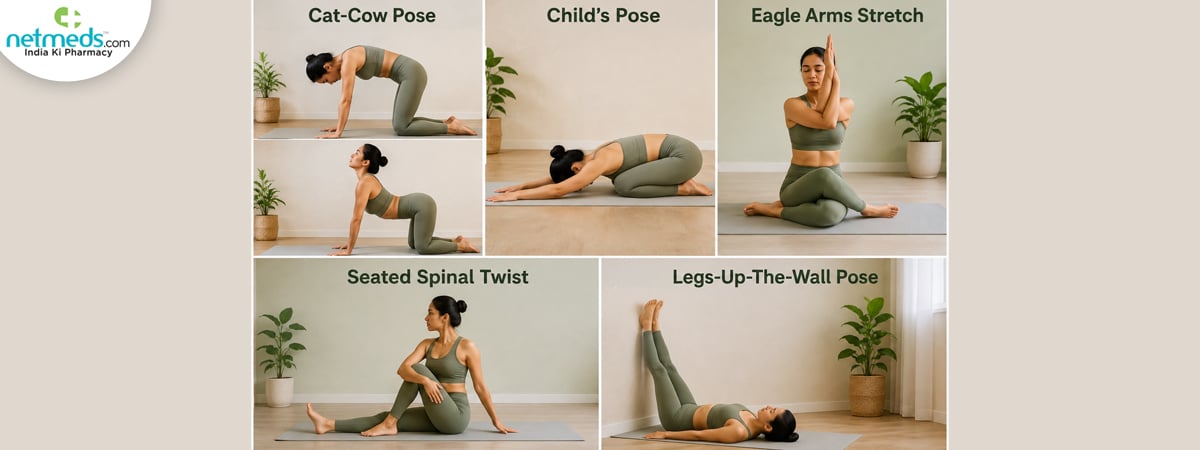
5 Best Yoga Poses For Digital Fatigue
Cat-Cow Pose (Marjaryasana-Bitilasana)
Start on your hands and knees with your wrists under your shoulders and knees beneath your hips. As you inhale, gently drop your abdomen, lift your chest and look slightly forward to come into Cow Pose. As you exhale, round your spine, gently tuck your chin towards your chest and draw your abdomen inward to come into Cat Pose. Continue slowly for 6–10 rounds, synchronising each movement with your breath.
Benefits
Cat-Cow gently moves the spine through flexion and extension and can help relieve stiffness after prolonged sitting. It also encourages awareness of spinal movement and may help loosen tension around the back and shoulders.
Child's Pose (Balasana)
Kneel on your yoga mat and sit back towards your heels. Separate your knees comfortably and slowly fold your upper body forward. Extend your arms in front of you or rest them alongside your body. Allow your forehead to rest on the mat or on a cushion if it doesn't comfortably reach the floor. Breathe slowly and hold for 30–60 seconds, or as comfortable.
Benefits
Child's Pose provides a gentle stretch for the back and hips while encouraging relaxation. It is particularly useful when mental fatigue is accompanied by feelings of stress or overstimulation.
Eagle Arms Stretch (Garudasana Arms)
Sit comfortably on a chair or yoga mat. Extend both arms in front of you. Cross your right arm over your left and bend both elbows. If comfortable, bring your palms together. Gently lift the elbows while keeping your shoulders relaxed. Hold for 15–30 seconds, breathing normally. Release and repeat on the opposite side.
Benefits
This stretch gently works the muscles around the shoulders and upper back. It can help reduce feelings of tightness caused by maintaining the same desk posture for long periods.
Seated Spinal Twist (Ardha Matsyendrasana Variation)
Sit upright with your legs comfortably extended or sit on a chair with your feet firmly on the floor. Place your right hand behind you and your left hand on your right thigh. Keeping your spine tall, gently rotate your torso towards the right. Do not force the twist or pull aggressively. Hold for 15–20 seconds, then slowly return to the centre. Repeat on the other side.
Benefits
A gentle spinal rotation can improve movement through the torso and help reduce feelings of stiffness after prolonged sitting.
Legs-Up-The-Wall Pose (Viparita Karani)
Sit sideways next to a wall. Slowly lie back while extending your legs upward against the wall. Allow your arms to rest comfortably beside your body. Close your eyes and breathe slowly. Stay in the position for 2–5 minutes, provided it feels comfortable.
Benefits
This gentle restorative position encourages relaxation and gives you an opportunity to step away from screens completely. Combining the pose with slow, mindful breathing can help create a calming end to a screen-heavy day.
Also Read: Yogasanas For Insomnia: 5 Calming Yoga Poses For A Night Of Peaceful Sleep
Who Can Practice These Yoga Poses?
These gentle movements may be suitable for:
Office workers
Students
Remote workers
People who spend long hours on computers
Individuals with sedentary lifestyles
People experiencing mild stiffness after prolonged sitting
Beginners looking for gentle yoga
Anyone wanting a mindful break from screens
However, individual suitability varies. If you have an injury, chronic pain or a medical condition, seek appropriate professional advice before beginning a new exercise routine.
Precautions
Yoga should feel comfortable and controlled, not painful.
Keep these precautions in mind:
Never force a stretch.
Keep breathing normally.
Move slowly between positions.
Stop if you experience sharp or worsening pain.
Avoid prolonged poses if you feel dizzy or unwell.
Modify poses according to your mobility.
Use a cushion or yoga block when needed.
If you have a significant musculoskeletal problem, seek professional guidance.
Important: Yoga is a supportive wellness practice and should not replace medical evaluation or treatment for persistent headaches, vision changes, severe neck pain, numbness, weakness or other concerning symptoms.
Conclusion
In a world where screens are an unavoidable part of work, education and entertainment, taking regular breaks is essential for both physical and mental wellbeing.
Yoga for digital fatigue offers a simple way to step away from the screen, move stiff muscles, improve body awareness and create a few quiet minutes in an otherwise busy day. The above mentioned yoga poses can be incorporated into a short routine whenever you feel physically tense or mentally overwhelmed after prolonged screen use.
But remember, yoga is only one part of the solution. Combine your practice with regular movement breaks, good workstation ergonomics, healthy sleep habits and sensible screen use.
Sometimes, the best way to refresh your mind isn't another app or another productivity hack. It is simply stepping away from the screen, taking a deep breath and moving your body.
References:
1.American Academy of Ophthalmology – Eye Health and Digital Device Use
https://www.aao.org/eye-health/tips-prevention/digital-devices-your-eyes
2.American Optometric Association – Computer Vision Syndrome
https://www.aoa.org/healthy-eyes/eye-and-vision-conditions/computer-vision-syndrome
3.World Health Organization – Physical Activity
https://www.who.int/news-room/fact-sheets/detail/physical-activity
4.National Center for Complementary and Integrative Health – Yoga: Effectiveness and Safety
https://www.nccih.nih.gov/health/yoga-effectiveness-and-safety
5.Harvard Health Publishing – Yoga for Stress and Well-Being
https://www.health.harvard.edu/staying-healthy/yoga-for-stress-relief
 Previous