






Netmeds First Membership
Description
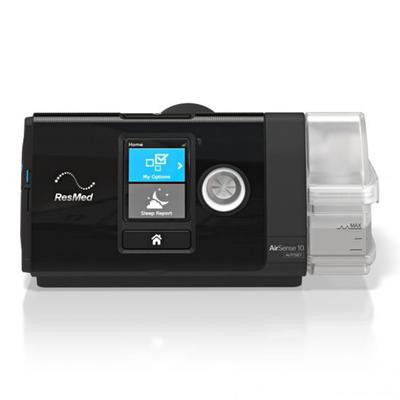
The Resmed AirSense 10 Autoset is an auto-adjusting CPAP device designed for the treatment of obstructive sleep apnea (OSA) in patients weighing more than 30 kg. This device automatically adjusts pressure levels throughout the night based on your real-time breathing patterns to provide the lowest pressure necessary. It features an integrated humidifier and wireless connectivity to help you stay comfortable and connected with your therapy progress.
AutoSet Algorithm: This technology monitors the user's breathing and continuously adjusts pressure to provide the minimal pressure needed for therapy.
Integrated HumidAir™ Humidifier: Delivers warm, moist air to help reduce common side effects of therapy like dry mouth and nasal irritation.
Expiratory Pressure Relief (EPR™): This feature lowers the pressure as you exhale, making breathing feel more natural and comfortable during therapy.
SmartStart™ Functionality: Therapy begins automatically as soon as you breathe into the mask and stops a few seconds after you remove it, simplifying operation.
myAir™ App Compatibility: Allows you to track your sleep therapy data, including usage hours and mask seal, directly from your smartphone.
Q: Is this a CPAP or an APAP machine?
A: The Resmed AirSense 10 AutoSet is an APAP (Automated Positive Airway Pressure) machine. It automatically adjusts the pressure throughout the night based on your breathing needs, unlike a standard CPAP which provides one fixed pressure.
Q: What is the function of the built-in humidifier?
A: The integrated HumidAir™ humidifier adds moisture to the therapy air. This helps to prevent dryness in the nose, mouth, and throat, making the therapy more comfortable.
Q: How should I clean the device and its components?
A: The water tub should be emptied daily and washed weekly with a mild detergent. The air tubing should also be washed weekly with mild soap and warm water. It is advisable to consult the user manual for detailed cleaning instructions for all parts.
Q: Can I monitor my sleep therapy data?
A: Yes, this device has built-in wireless connectivity that syncs with the myAir™ app. This allows you to track your therapy data, such as usage hours and events per hour, on your smartphone or computer.
Q: Is it necessary to consult a healthcare provider before using this device?
A: Yes, this is a medical device used for treating sleep apnea. It is intended to be used based on a prescription and under the guidance of a qualified healthcare professional who will set the appropriate therapy pressures for your condition.
The Resmed AirSense 10 Autoset is an auto-adjusting CPAP device designed for the treatment of obstructive sleep apnea (OSA) in patients weighing more than 30 kg. This device automatically adjusts p...
Key Benefits
The device is indicated for the treatment of obstructive sleep apnea (OSA) in patients weighing more than 66 lb (30 kg).
Its auto-adjusting algorithm works to provide the ideal, lowest therapy pressure as your needs change hourly and nightly.
The integrated humidifier and optional heated tube help to deliver moisture and warmth, reducing dryness in the nose and throat.
Advanced event detection can identify central sleep apnea and Cheyne-Stokes respiration, providing valuable insights to your physician.
The quiet Easy-Breathe motor contributes to a peaceful environment for both the user and their bed partner.
The device is indicated for the treatment of obstructive sleep apnea (OSA) in patients weighing more than 66 lb (30 kg).
Its auto-adjusting algorithm works to provide the ideal, lowest therapy ...
Direction for Use/Dosage
Place the device on a stable, level surface.
Connect the power cord to the power supply unit, plug it into the device's rear, and then into a power outlet.
Fill the HumidAir™ water tub with distilled water up to the maximum fill line and insert it into the side of the device.
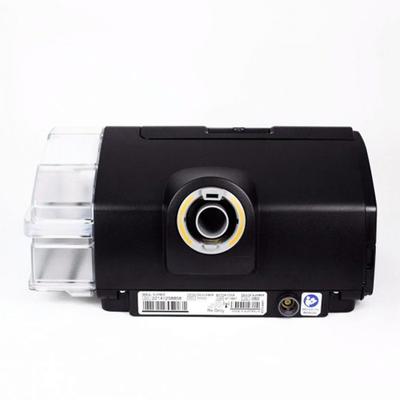
Firmly connect the air tubing to the air outlet on the back of the machine and the other end to your assembled mask.
Fit your mask, and therapy will begin when you press the Start/Stop button or breathe into the mask if SmartStart is enabled.
To stop therapy, press the Start/Stop button or simply remove your mask.
Place the device on a stable, level surface.
Connect the power cord to the power supply unit, plug it into the device's rear, and then into a power outlet.
Fill the HumidAir™ water tub with...
Safety Information/Precaution
Read the entire user guide before using the device.
This device should only be used by or on the order of a physician.
Positive airway pressure therapy may be contraindicated for individuals with certain pre-existing conditions such as severe bullous lung disease, pneumothorax, pathologically low blood pressure, or recent cranial surgery.
Consult your prescribing physician if you experience unusual chest pain, severe headache, or increased breathlessness.
Use only distilled water in the humidifier to prevent mineral deposits that could damage the device. Do not travel with water in the chamber.
Potential side effects may include drying of the nose, mouth, or throat, bloating, ear or sinus discomfort, and skin rashes.
Read the entire user guide before using the device.
This device should only be used by or on the order of a physician.
Positive airway pressure therapy may be contraindicated for individual...
Other Information
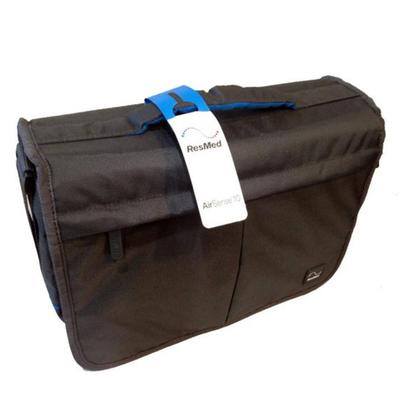
The device comes with a travel bag for transport. When traveling, empty the water tub and pack it separately. The device meets FAA requirements for in-flight use. The package typically includes the device with integrated humidifier, a water tub, air tubing, a power supply unit, and a travel bag. The device has a light sensor that adjusts screen brightness based on ambient light in the room. It also features built-in wireless technology for remote data transmission.
The device comes with a travel bag for transport. When traveling, empty the water tub and pack it separately. The device meets FAA requirements for in-flight use. The package typically includes the...